
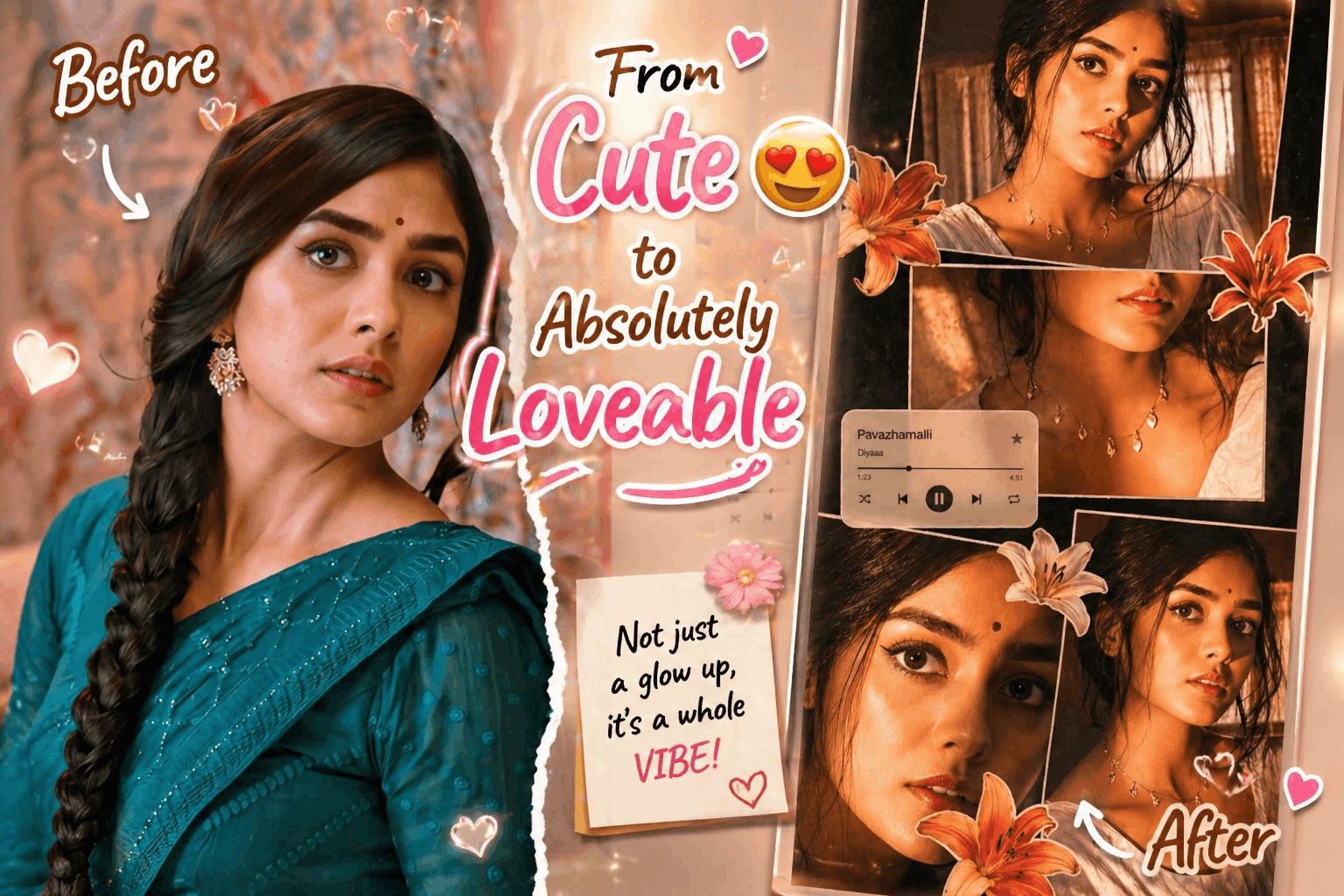
🌟 How to create this Trending College Editing 2026
Creating a cinematic collage portrait with a dreamy, vintage flash-photography vibe is one of the most trending visual styles right now. This guide walks you through how to design a multi-panel scrapbook-style image with rich golden tones, dramatic lighting, and aesthetic overlays—perfect for social media, portfolios, or creative projects.
Thank you for reading this post, don't forget to subscribe!🎬 What Is a Cinematic Collage Portrait?
A cinematic collage combines multiple photo panels of the same subject into one cohesive artwork. Instead of a single image, you layer different angles, expressions, and close-ups to tell a visual story.
This style stands out because of:
✨ Dramatic lighting
✨ Film-inspired color grading
✨ Layered scrapbook composition
✨ Artistic overlays like stickers and UI elements
🔥 Key Visual Elements You Need
1. 📸 Lighting Style (Golden Flash Effect)
The signature look comes from strong, warm direct flash lighting:
- Light source: front-left angle
- Tone: golden-orange / amber
- Effect: high contrast with deep shadows
- Highlights: cheekbones, nose, lips glow intensely
💡 Tip: Keep the background dark with faint curtain visibility to enhance subject focus.
2. 🎨 Color Grading (Vintage Warm Aesthetic)
To achieve the cinematic mood:
- Dominant tones: amber, burnt orange, gold
- Increase saturation slightly
- Crush blacks for depth
- Add glowing highlights for softness
✨ Add slight film grain + blur for that nostalgic camera feel
3. 👩🎨 Subject Styling
Keep the look natural yet polished:
- Hair: messy tied-back with loose strands
- Makeup: glossy lips, subtle eyeliner, dewy skin
- Outfit: simple white top
- Accessories: delicate necklace with small pendants
This combination enhances realism while maintaining elegance.
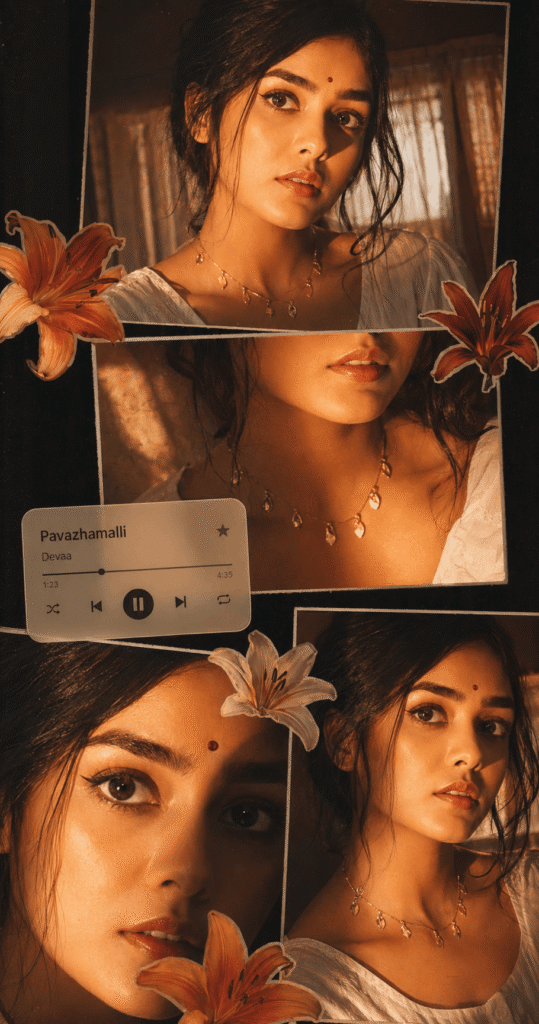
🧩 Collage Composition Layout
Arrange your panels creatively with slight overlaps:
🔝 Top Panel
- Expression: serious
- Eye contact: direct
- Purpose: strong focal introduction
💋 Middle Panel
- Close-up: lips + necklace
- Adds detail and texture
👁 Bottom Left Panel
- Extreme close-up of eyes
- Use shadow split for dramatic effect
😌 Bottom Right Panel
- Angled portrait
- Soft side gaze for emotional depth
📐 Keep spacing uneven for an authentic scrapbook feel.
🌸 Creative Overlay Elements
Enhance your collage with aesthetic additions:
🌺 Flower Stickers
- Use lilies in orange, cream, and red
- Place them around edges and between panels
🎵 Music Player UI Card
Add a soft rounded music widget for a modern touch:
Text to include:
- Title: Pavazhamalli
- Artist: Devaa
🎧 Include minimal UI elements:
- Play/Pause button
- Skip icons
- Progress bar
Position it slightly center-left for balance.

✨ Final Touches for Perfection
✔ Add subtle glow/bloom to highlights
✔ Apply a soft vignette around edges
✔ Maintain natural skin texture (avoid over-smoothing)
✔ Keep a slight digital camera flash feel (night photography look)
🚀 Why This Style Is Trending
This aesthetic is popular because it blends:
📷 Nostalgia (film & flash photography)
🎨 Modern design (UI overlays & collage layouts)
💫 Emotional storytelling (multiple expressions in one frame)
Perfect for platforms like Instagram, Pinterest, and portfolio showcases.
✅ Conclusion
A cinematic collage portrait is more than just editing—it’s visual storytelling. By combining warm lighting, layered compositions, and artistic overlays, you can create a stunning, ultra-realistic piece that feels both personal and professional.
Experiment with angles, lighting intensity, and placement to make the collage uniquely yours.
❓ FAQs
1. How do I achieve the golden-orange lighting effect?
Use a warm-toned light source or adjust white balance in editing. Increase temperature and add contrast to mimic direct flash lighting.
2. Which apps can I use to create this collage?
You can use tools like Photoshop, Lightroom, Canva, or mobile apps like PicsArt for layering and color grading.
3. How do I make the collage look realistic and not over-edited?
Keep skin texture natural, avoid excessive smoothing, and add subtle grain. Balanced highlights and shadows help maintain realism.

